Use a template
Overview
Using a template is very straightforward. We’ve included some instructions below, along with a few items to keep in mind as you interact with templates in Chronicler.
How to use a template
-
Click the “Templates” button in the upper right corner of the Notebuilder.
-
Select the name of the template that you’d like to use.
-
Click the “Use” button to load that template into the note builder.
You’re all set! Chronicler will instantly compose a note using statements from the template.
Things to keep in mind
-
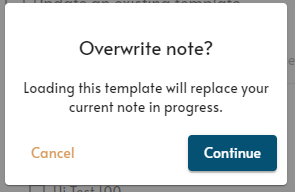
If you have a note in progress, Chronicler will ask for confirmation before overwriting that note with your selected template.
-
The “templates” button will turn gold when you are using a template.
-
Certain statements are not automatically added into the note.
- These include:
- Statements with a scale (severity, s.u.d.s, v.o.c., goals, etc).
- Statements that have a pop up for the client’s location.
- Chronicler displays these in red to make it easy to know which statements may need your attention.

- You can add these statements back in if you wish, but it is not required.
- These include: